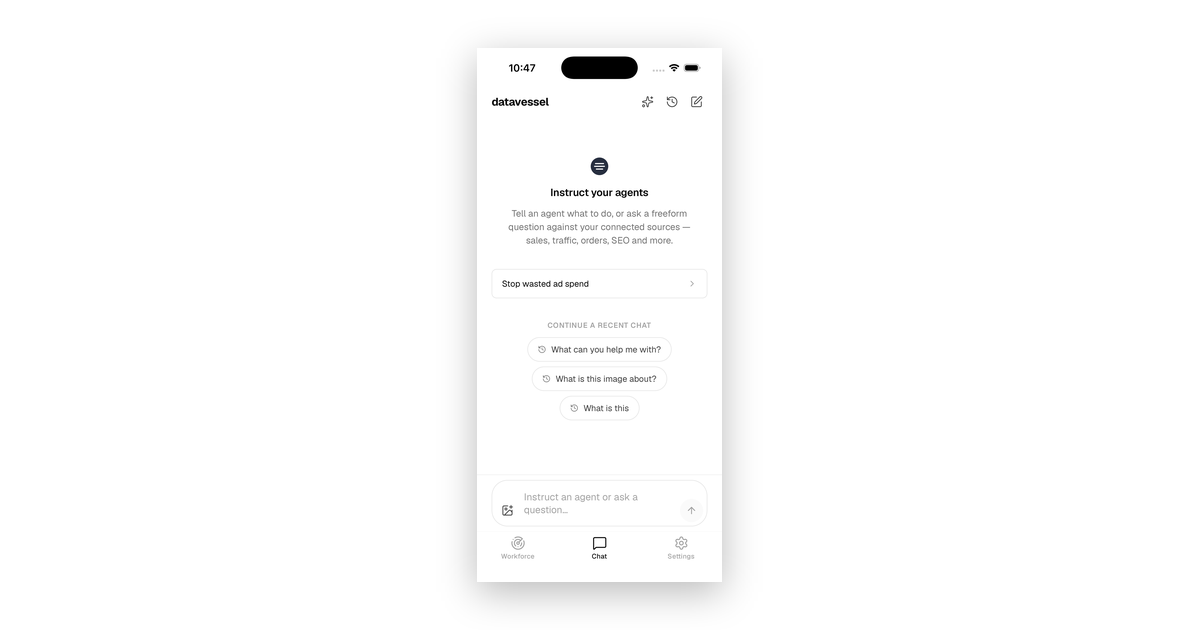
datavessel 1.2 is live on the App Store and Google Play — and it’s the release that turns the mobile app from “chat with your agent” into “run your whole store from your pocket.” Every source you can connect on the web, you can now connect on your phone. We’re genuinely proud of this one, so here’s what shipped.
Connect every source — right from your phone
This is the headline. Until now, the mobile app could only add the simple one-tap OAuth sources; anything that needed a store URL or an API key got punted to the web app. Not anymore. datavessel 1.2 brings the full connector lineup to iOS and Android:
- Shopify, WooCommerce, and Shopware — your stores
- WordPress — your blog and content
- Gorgias — your support desk
- …alongside the OAuth sources already onboard: Google Analytics, Search Console, Google Ads, and Meta Ads
Each source now gets a native connect screen with proper labels, help text, and validation — plus a little badge on every row so you know at a glance whether it’s a one-tap Connect or needs your Store URL. Onboard your entire stack standing in line for coffee.
One-tap starters for the jobs that actually move the needle
Open a fresh chat and you’re no longer staring at a blank box. datavessel 1.2 greets you with high-value use-case starters — the exact jobs store owners keep putting off — tailored to the sources you’ve connected. Tap one and the agent gets to work (writes still wait for your approval):
- Stop wasted ad spend — find Google Ads campaigns and keywords burning budget with no conversions, and pause them.
- Never oversell a sold-out product — catch inventory problems before they cost you.
- Fix my weak product pages — clean up listings that underperform.
- Grow my organic traffic — surface rising Search Console queries you don’t have a strong page for yet.
- Clear my support queue — get through the tickets piling up.
Show your agent what you mean — attach images
You can now attach images to a chat message. Screenshot a broken page, snap a product photo, share a dashboard — and hand it straight to your agent for context. Sometimes a picture really is the fastest way to explain the problem.
Stop a run whenever you want
Changed your mind mid-task? datavessel 1.2 adds a stop control for an in-progress agent run — the run button becomes a stop button while the agent is working. You’re always in command of what’s happening.
Quieter, more considered
Under the hood, 1.2 adds a quiet layer of polish — including in-app account deletion and safer handling of links in chat. Small things that make the whole app feel more considered.
Get datavessel 1.2
The update is rolling out now on both platforms. If you already have the app, it’ll update automatically — or grab it fresh from the App Store or Google Play. Connect your stores, tap a starter, and let your agents get to work.
Your store, in your pocket. You pilot — the agents do the work.
New to datavessel? datavessel is e-commerce autopilot for Shopify, Shopware, and WooCommerce — now fully on mobile. Learn what e-commerce autopilot is →
Leave a Reply