TL;DR: DataVessel now offers guided prompts for Google Search Console that run expert-level analysis automatically. Open Claude Desktop or the Claude mobile app, select a prompt like “Search Health Check” or “Find Keyword Opportunities,” and get comprehensive insights without knowing which tools to call.
Running a proper SEO audit used to mean knowing which metrics matter, which tools to use, and how to interpret the results. With DataVessel’s new GSC prompts, you select what you want to know and the analysis runs itself.
The prompts are available in Claude Desktop and the Claude mobile app. Pick one from the menu, and Claude executes a complete workflow—calling the right tools, interpreting results, and delivering actionable insights.
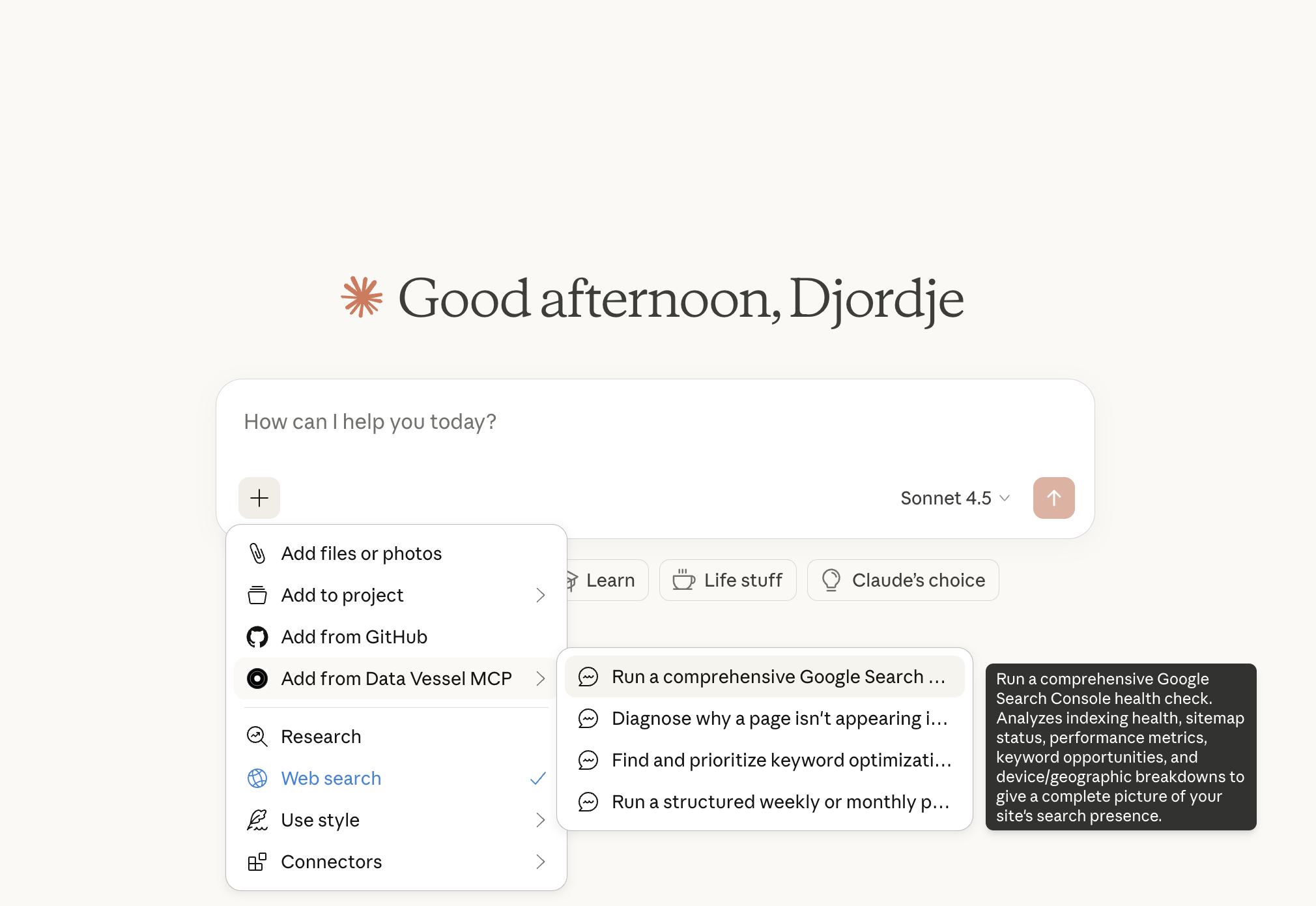
Four Prompts for Common SEO Questions
Each prompt maps to a question site owners ask regularly:
Search Health Check
Run a comprehensive SEO health audit of your website. Covers indexing status, sitemap health, performance trends, and optimization opportunities. Returns a health score with prioritized action items.
Why Isn’t My Page Indexed?
Diagnose why a specific page isn’t appearing in Google search results. Checks URL inspection data, crawl status, noindex directives, and technical blockers. Tells you exactly what’s preventing indexing.
Find Keyword Opportunities
Discover high-impact keywords to optimize for more traffic. Identifies terms where you’re ranking on page 2, keywords with high impressions but low clicks, and quick wins that don’t require new content.
Weekly Review
Structured comparison of this period versus last. Shows what improved, what declined, and surfaces anomalies worth investigating. Formats results as clear comparison tables.
New: add performance alerting to your GSC workflow
Prompts help you analyze. But most teams lose traffic because they discover issues too late. The missing piece is alerting: impressions/click drops vs rolling baselines, CTR drops on high-impression pages, and ranking losses for priority URLs.
We put a practical, Slack-ready alert spec here: Google Search Console Alerts: What Matters + A Slack Alert Spec.
How to Use
Once you’ve connected Google Search Console to DataVessel:
- Open Claude Desktop or the Claude mobile app
- Click the prompts menu (or type
/) - Select the GSC analysis you want to run
- Claude handles the rest
No need to remember tool names or figure out the right sequence of API calls. The prompt encodes the full workflow and domain expertise.
What You Get
Each prompt delivers more than raw data. You get:
- Interpreted results — Not just “CTR is 0.8%” but “CTR is below average, suggesting title and meta description improvements”
- Prioritized actions — Issues ranked by impact so you know what to fix first
- Context — How current metrics compare to previous periods
- Next steps — Option to generate PDF reports or dive deeper into specific areas
Get Started
GSC prompts are available now for all DataVessel users with Google Search Console connected. Open Claude Desktop or the mobile app and try a health check on your site.
Haven’t connected Search Console yet? Link your account at app.datavessel.io—takes 30 seconds.
Leave a Reply