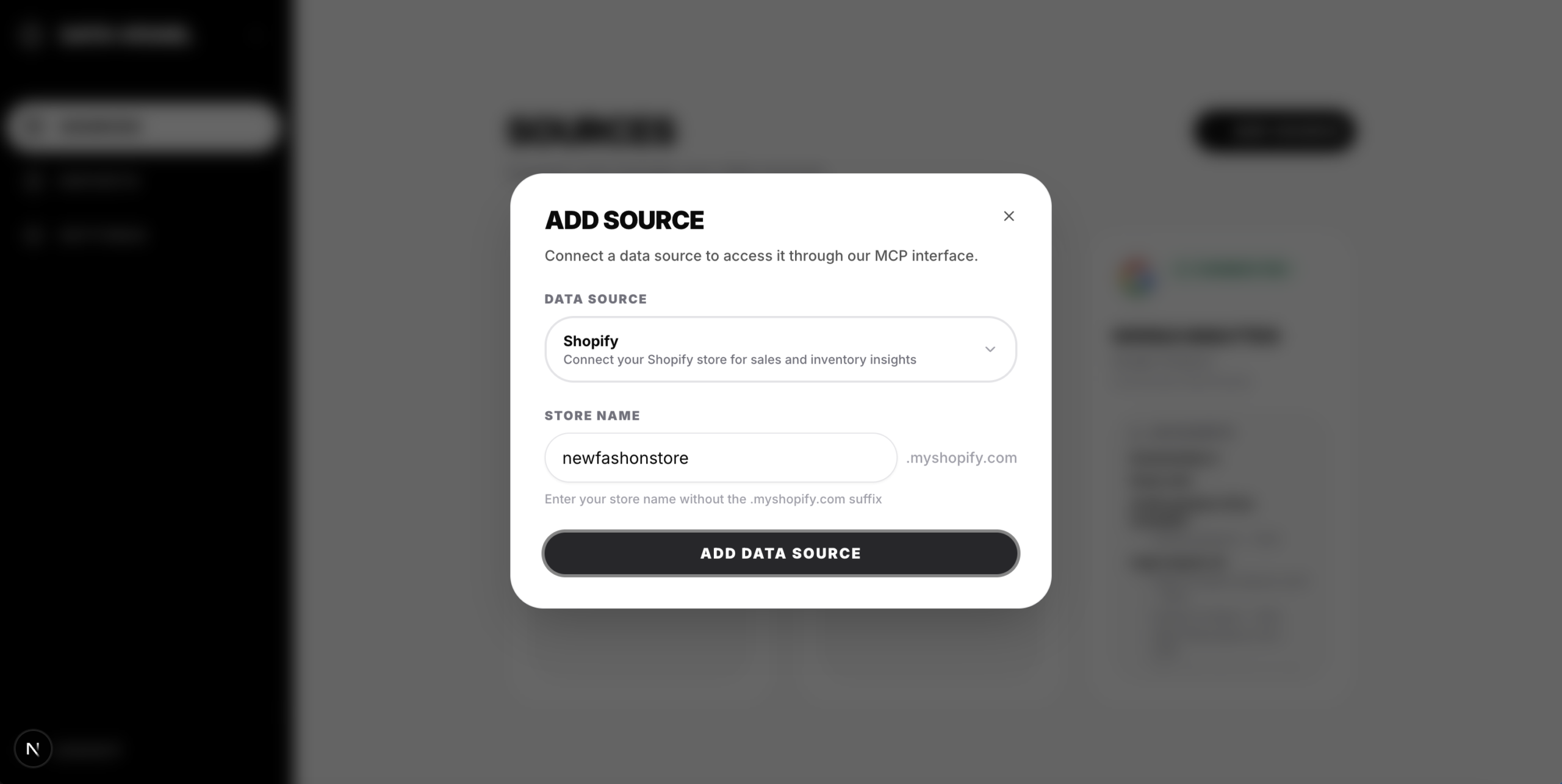
TL;DR: DataVessel’s Shopify integration is now in beta at app.datavessel.io. Connect your store and ask questions about orders, inventory, products, and sales analytics in plain English. Some features like customer data access are limited until Shopify completes their app review. Core functionality works today—we’re iterating based on early feedback.
We’ve shipped the feature many of you requested: Shopify integration is now available in DataVessel as a public beta. Connect your store and manage your business through conversation—check inventory, analyze sales, update products, and create discount codes without touching Shopify’s admin panel.
The integration is live at app.datavessel.io and ready for testing today.
Trying to connect Claude to Shopify? Start with the no-code Claude + Shopify analytics guide to compare DataVessel, Shopify’s AI Toolkit, and technical MCP server options.
If you’re connecting Shopify to marketplace channels (Secret Sales, etc.), use this merchant-side setup + troubleshooting guide (SKU mapping, order import failures, inventory drift, payout mismatch, and monitoring): Secret Sales Shopify integration connector + monitoring guide.
If you’re already live on marketplaces: integrations tend to fail quietly (missing orders, inventory drift, tracking not syncing). Here’s an operational monitoring playbook with a Slack alert spec: Marketplace Order Sync Monitoring: Shopify Troubleshooting + Alerts.
What You Can Do With the Shopify Integration
This isn’t just read-only analytics. The integration gives you full conversational access to your store operations.
Orders & Sales Analysis
- “Show me all unfulfilled orders from this week”
- “What’s the total revenue for January?”
- “List orders with pending payment”
- “Get details for order #1042”
Inventory Management
- “Which products are low in stock?”
- “What’s the inventory level for Blue Widget across all locations?”
- “Add 50 units to SKU-12345 at the main warehouse”
Product Catalog
- “Show me all draft products”
- “What products are in the Summer Sale collection?”
- “Update the description for product X”
- “Add tags ‘bestseller’ and ‘featured’ to product Y”
Customer Insights (Limited in Beta)
- “Show me customers who signed up last month”
- “Who are my top customers by order value?”
Note: Access to protected customer data (email addresses, personal details) requires Shopify’s approval of our app. During beta, customer queries return anonymized or aggregated data only. Full customer access will be enabled once Shopify completes their review.
Discounts & Promotions
- “List all active discount codes”
- “Create a 20% off code called SPRING20”
- “Make a $10 off discount for orders over $50”
Store Analytics
- “What are my top selling products this month?”
- “Show me revenue breakdown by product type”
- “Compare this week’s orders to last week”
How to Connect Your Store
Setup takes less than a minute:
- Log in at app.datavessel.io
- Navigate to Data Sources and select Shopify
- Authorize DataVessel to access your store
- Start asking questions
The connection uses OAuth—you never share your Shopify password. You control what DataVessel can access, and you can revoke permissions anytime from your Shopify admin.
Beta Limitations & App Review Status
During authorization, you’ll see a notice that DataVessel isn’t yet a verified Shopify partner. This is expected—we’re currently in Shopify’s app review process.
Until Shopify approves our app, some features are limited:
- Protected customer data: Access to customer emails, personal details, and full customer profiles is restricted. Customer queries return aggregated or anonymized data only.
- Developer warning: You’ll see an “untrusted developer” notice during setup—this disappears after approval.
What works fully today:
- Orders and sales data (full access)
- Product catalog and inventory management
- Discount creation and management
- Store analytics and revenue metrics
We’ve submitted DataVessel for Shopify’s review. Approval typically takes several weeks. Once approved, customer data access unlocks automatically and the developer warning disappears. We’ll update this post when that happens.
Try the Beta Today
The Shopify integration beta is available now for all DataVessel users. Whether you’re checking inventory levels, analyzing sales trends, or creating a quick discount code, you can do it through conversation instead of clicking through admin screens.
Ready to try the beta? Connect your store at app.datavessel.io and ask your first question.
Questions, bugs, or feature requests? We’re actively iterating based on beta feedback—your input directly shapes what we build next.
Leave a Reply